Different Bluetooth protocols
MFi stands for "Made for iPhone/iPod/iPad." and is a program to ensure that third-party accessories (like cables, chargers, and headphones) meet the specific performance and safety standards of Apple.
Seamless integration and control
Wearers can easily control volume, programs, and settings directly from their Apple device using the native Accessibility menu or dedicated apps. This provides an intuitive and easy-to-use experience.
High-quality sound
The dedicated wireless connection offers stable, high-fidelity sound for both streaming and phone calls, enhancing the overall listening experience.
Bluetooth Low Energy Audio is the successor of Bluetooth Classic and provides more advantages:
Energy efficiency
Bluetooth LE Audio is built on the Bluetooth Low Energy technology, which is optimized for minimal power consumption. This means hearing aid wearers can stream audio from compatible devices throughout the day without significantly impacting their hearing aid´s battery life.
Improved sound quality
The LC3 codec used in Bluetooth LE Audio offers improved sound clarity at lower data rates, providing reliable, high-fidelity music and speech streaming, even in environments with limited wireless bandwidth.
Future-ready and forward-looking
Bluetooth LE Audio is progressing gradually, being integrated into technological devices such as smartphones and computers.
ASHA is short for “Audio Streaming for Hearing Aids”
Direct streaming from Android devices:
ASHA allows wearers to stream high-quality audio - including phone calls, music, and media - directly from many compatible Android smartphones and tablets to their hearing aids.
Stability and sound quality:
It provides a stable wireless connection for clear, reliable, and synchronized audio streaming, enhancing speech understanding and overall listening comfort during calls and media playback.
Bluetooth Classic Audio refers to the original set of audio streaming technologies and offers a lot of options:
Universal compatibility:
Bluetooth Classic Audio is supported by the vast majority of mobile phones and devices in use today, including many older models. This makes it the most universally compatible streaming solution currently available, promoting nearly every wearer to benefit from wireless audio - regardless of their phone or computer type.
Hands-free calling:
With Bluetooth Classic Audio, wearers can enjoy two-way hands-free (hearing and speaking) calls - not just on iOS, but also on a wide range of Android phones and other devices, like computers and tablets, that are equipped with Bluetooth Classic. The protocol supports robust hands-free telephony, making everyday communication simpler and more accessible.
Long established, proven performance:
As a widely adopted technology, Bluetooth Classic Audio offers mature stability and reliability, with proven performance in thousands of consumer electronics products. Its mature ecosystem reduces technical challenges in pairing, connecting stability, and compatibility.
Connectivity options for Audio Service hearing aids
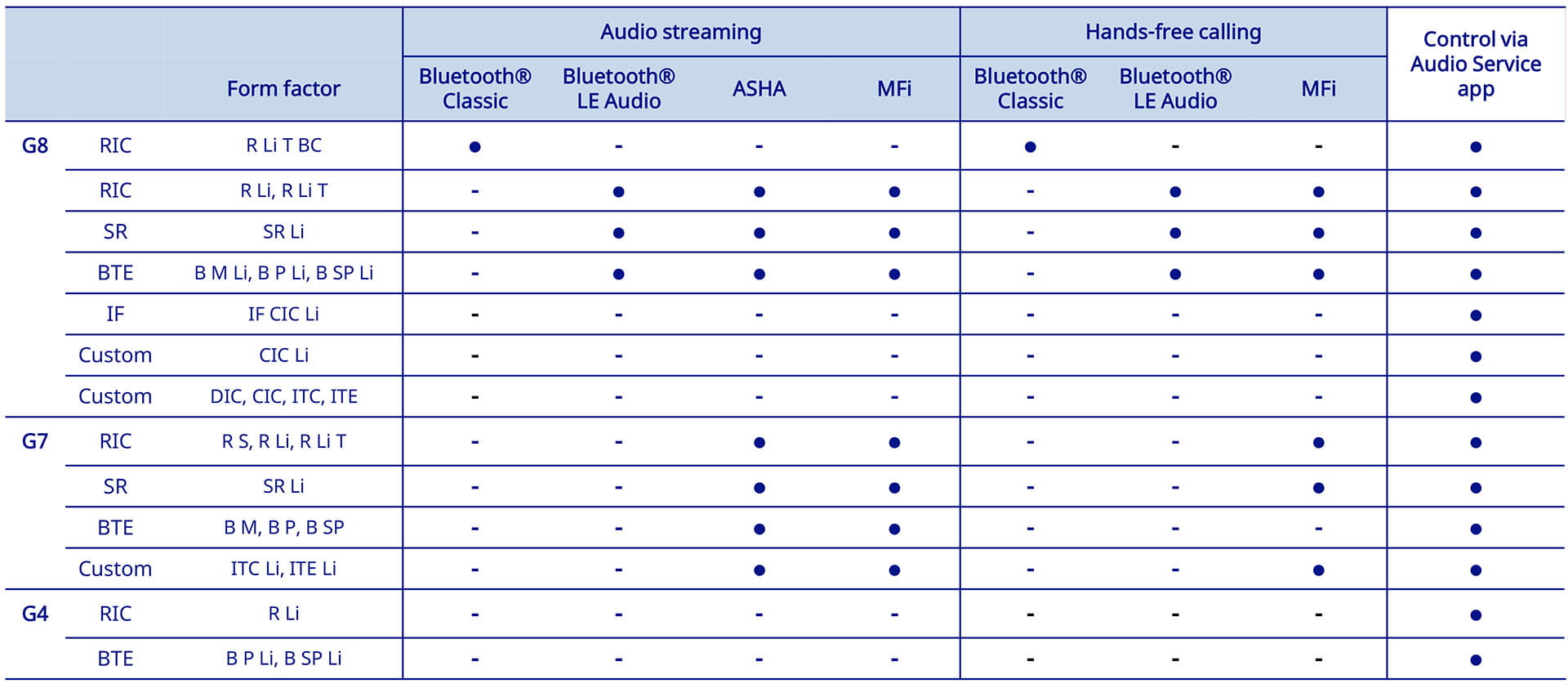
Downloads
- Overview of Audio Service Bluetooth enabled hearing aids and integrated protocols Uploaded | PDF | 0.04 MB
- How to pair your Audio Service hearing aids for direct streaming Uploaded | PDF | 1.22 MB
FAQs
No, wireless is not equal to Bluetooth. Wireless functionality means that data can be exchanged without physical cables to hearing aids. Bluetooth allows audio streaming and direct app connectivity.
Different streaming protocols were developed for different smartphones / devices. This video gives a short overview:
1. Check device compatibility
- Ensure the hearing aids and the connected device (smartphone, tablet) support the same Bluetooth protocol (e.g., MFi for iOS, ASHA for Android, or Bluetooth Classic). See compatibility overview
- For advanced features like HandsFree calling, MFi pairing is required on iOS devices.
2. Restart devices
- Turn off and then turn on both the hearing aids and the connected device.
- Restart the app
3. Verify Bluetooth settings
- Make sure Bluetooth is enabled on the smartphone.
- Delete the hearing aids in the Bluetooth settings and pair them again.
4. Pairing process
For iOS (MFi):
- Go to Settings → Accessibility → Hearing Devices and pair the hearing aids.
- Alternatively, start pairing directly in the app and complete MFi pairing later for full functionality (HandsFree calling, iOS controls).
For Android (ASHA):
- Pair through the app or Bluetooth settings as instructed by the app.
5. App updates
- Ensure the hearing aid app is updated to the latest version.
- Check for firmware updates for the hearing aids.
6. Reset network settings
- If issues persist, reset the network settings on the smartphone (this will remove all paired devices).
7. Environmental interference
- Move away from potential interference sources (Wi-Fi routers, microwaves, other Bluetooth devices).
Most current Audio Service hearing aids can stream music and phone calls directly to the hearing aids—but it depends on the platform and model.
Audio Service devices on the latest G8 and G7 platforms (e.g., R Li, SR Li, ITC Li) offer Bluetooth® audio streaming for both iOS and Android:
- iOS: Uses Made for iPhone (MFi).
- Android: Uses ASHA (Audio Streaming for Hearing Aids) and Bluetooth LE Audio if the smartphone is compatible (Android 10 or newer).
Other devices in the portfolio without Bluetooth® or battery-powered custom CIC/ITE options do not support direct streaming.
If you are not satisfied with the streaming audio quality on your hearing aids, there are several ways to enhance your listening experience.
Adjust sound settings in the Audio Service app to fine-tune the audio based on your personal preferences. Use the Sound Balance slider while streaming audio. Move the slider toward Sharp to increase treble and enhance clarity. Move it toward Soft to reduce high-frequency sounds for a smoother listening experience.
For more precise improvements visit your hearing care professional. They can use programming software to equalize more specific frequencies.
Keep in mind that sound quality is optimized according to your hearing prescription, so it will differ from standard headphones or earbuds.
If you are streaming through the Low Energy Audio (LE Audio), it's possible that any equalization apps or settings built into the operating system of the phone can further affect streaming audio.
Want more support? These sections can help.

Pairing of hearing aids
Learn how to pair your hearing aids with different Bluetooth protocols.

Support for the Audio Service app
Learn how to use the Audio Service app to adjust your hearing aid settings.

Support for
accessories
Learn how to maintain, pair and manage remote controls, streamers, and chargers.